

Avant et après : comment une collectivité locale française a déployé l'authentification multifactorielle (MFA) et l'authentification unique (SSO) sur tous les canaux d'accès, sans quitter son Active Directory sur site
Avant et après : comment une collectivité locale française a apporté l'authentification multifacteur (MFA) et l'authentification unique (SSO) à chaque chemin d'accès, sans quitter son Active Directory sur site
Une collectivité locale française gère son infrastructure d’identité comme le font de très nombreux organismes publics : un Active Directory sur site au cœur du système, auquel se connectent plus d’un millier d’employés pour s’authentifier. Cependant, les solutions qui s’appuyaient sur cet annuaire étaient devenues fragmentées. Une solution d’authentification multifactorielle (MFA) tierce ne protégeait qu’une centaine de comptes. L’appareil VPN SSL utilisé pour l’accès à distance était fourni avec l’application mobile token propre au fournisseur, utilisable uniquement pour le VPN et rien d’autre. Un projet d’authentification unique (SSO) était sur le point d’ajouter une nouvelle pile, Keycloak figurant sur la liste des fournisseurs d’identité présélectionnés. Et tout le reste — sessions Windows, sessions macOS, intranet, plateforme de gestion des services informatiques — était protégé uniquement par le mot de passe AD.
Ce changement de cap s’est produit lorsque l’organisation a analysé la refonte de son infrastructure. Plutôt que de développer chaque silo séparément, elle a cherché une plateforme sur site unique capable de prendre en charge à la fois l’authentification multifactorielle (MFA) et l’authentification unique (SSO), sur tous les chemins d’accès, tout en conservant Active Directory exactement là où il se trouvait. C’est ce que nous avons mis en place avec leurs équipes lors de la phase de validation du concept, en nous appuyant sur OpenOTP, le serveur d’authentification RCDevs, et WebADM, la console IAM centrale qui gère et pilote l’ensemble des services de la suite. L’article se termine par une comparaison « avant/après » qui a motivé cette décision.
Pourquoi les couches de sécurité MFA par compte et les appliances token ne sont pas évolutives
Une surcouche MFA facturée par compte protégé a du sens lorsque l'objectif est une poignée d'utilisateurs privilégiés. Elle n'a plus de sens dès que l'objectif devient la MFA partout. Les chiffres que l'organisation nous a communiqués parlaient d'eux-mêmes : des frais annuels à cinq chiffres couvraient moins d'une centaine de comptes, et à ce coût par compte, étendre la même couverture à l'ensemble des effectifs n'a jamais été une option réaliste. L'économie des surcouches par compte s'effondre précisément lorsque vous décidez que chaque utilisateur, et pas seulement les quelques privilégiés, mérite un second facteur.
Le dispositif token présentait le même problème sous une autre forme. Un deuxième facteur intégré à un dispositif réseau ne résout qu’un seul aspect de la sécurité périmétrique : l’authentification sur ce dispositif. Chaque système supplémentaire nécessite alors son propre dispositif d’authentification, sa propre procédure d’inscription et son propre parcours d’assistance lorsqu’un utilisateur change de téléphone. Les politiques ne peuvent pas être appliquées de manière cohérente, car elles ne sont pas centralisées en un seul endroit, et la révocation doit être effectuée séparément pour chaque silo lorsqu’un utilisateur quitte l’entreprise. L’organisation souhaitait disposer d’un moteur de politiques unique pour l’ensemble de ces éléments.
La consolidation a également inversé la logique des coûts. Par rapport au tarif par compte que l'organisation payait pour sa précédente solution MFA, le tarif par utilisateur d'OpenOTP dans ce projet réduit le coût d'un utilisateur protégé par un facteur de cinq à dix. La sécurisation de chaque chemin d'accès, dans ce cas, n'a pas entraîné de surcoût : elle a coûté une fraction de ce que coûtait auparavant la protection d'un petit sous-ensemble de comptes par personne.
SSO avec Keycloak, ou intégré à la même plateforme que l'authentification multifacteur ?
La question de l'authentification unique (SSO) méritait sa propre décision. Keycloak, le fournisseur d'identité open-source présélectionné par l'organisation, est un choix légitime et largement déployé. Mais gratuit en licence ne signifie pas gratuit en exploitation : c'est une pile supplémentaire à déployer, mettre à jour, sécuriser et exploiter, à côté de ce qui gère l'authentification multifacteur (MFA), avec deux configurations à maintenir cohérentes.
Comme WebADM inclut déjà des services de fédération prenant en charge SAML2, OpenID Connect et OAuth, l'organisation a choisi d'intégrer l'authentification unique (SSO) dans la même plateforme que l'authentification multifacteur (MFA). La raison, telle qu'ils l'ont exprimée, était simplement moins de choses à gérer : un moteur de règles décide désormais à la fois ce qu'un utilisateur doit présenter pour s'authentifier et pour quelles applications cette session est valide.
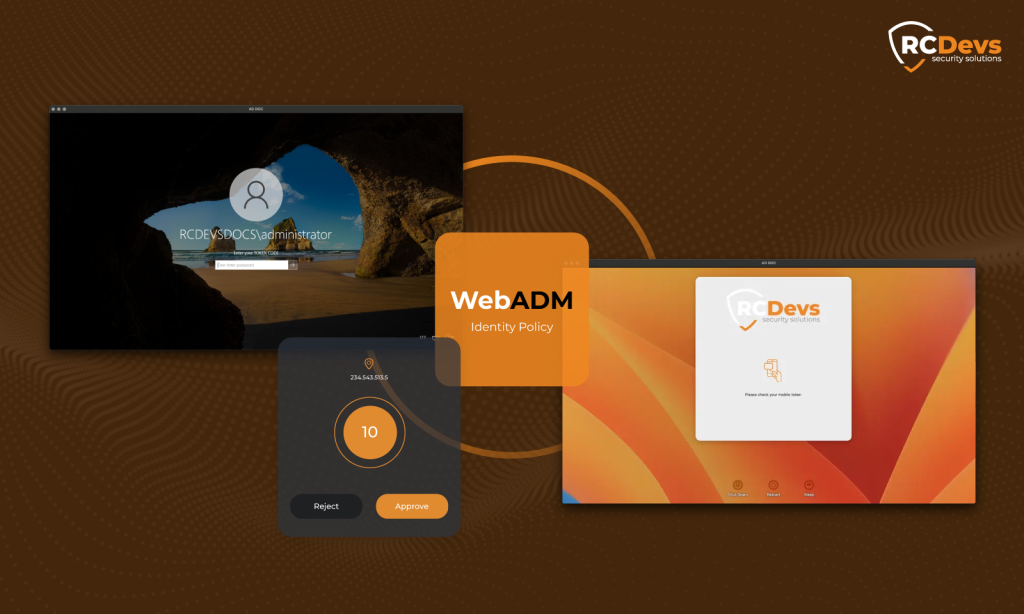
Ajout de l'authentification multifacteur (MFA) aux connexions Windows et macOS sur un domaine Active Directory
Les connexions aux postes de travail ont été le premier périmètre de la preuve de concept. Sur le parc Windows, le fournisseur d'informations d'identification OpenOTP insère le second facteur directement dans la connexion Windows : l'utilisateur saisit les informations d'identification AD comme d'habitude, puis confirme une notification push dans le Application OpenOTP Token. OpenOTP gère les deux facteurs : il valide le mot de passe et applique le deuxième facteur conformément aux politiques définies. Active Directory reste la source de vérité : le mot de passe est validé par rapport à AD lors de la connexion.
L'organisation dispose également de machines macOS dans le même domaine, ce qui est moins courant dans le secteur public et exclut toute solution conçue uniquement pour les terminaux Windows. Le fournisseur d'identification OpenOTP pour macOS intègre ces sessions sous la même politique : même confirmation par message push, même serveur, même console. Pour les administrateurs, les connexions macOS et Windows sont configurées et appliquées à partir du même endroit, plutôt que par deux outils distincts.
Authentification unique SAML pour l'intranet : GLPI, WordPress et applications derrière un proxy inverse
Le périmètre web est venu ensuite. Les applications intranet de l'organisation étaient connectées au fournisseur d'identité de la plateforme via SAML, de sorte que l'authentification se produise une seule fois, au niveau de l'IdP, avec une authentification multifacteur (MFA) imposée à cet endroit plutôt que répliquée dans chaque application.
Deux de ces applications méritent d’être mentionnées car de nombreuses organisations les utilisent. GLPI, la plateforme open-source de gestion de services informatiques utilisée pour orchestrer les tickets et les requêtes entre les équipes informatiques, a été intégrée via SAML ; SAML et OpenID Connect ont tous deux été testés lors des sessions avant que la voie SAML ne soit retenue. Les sites WordPress de l’intranet ont été connectés de la même manière. Dans les deux cas, l’application délègue entièrement l’authentification : l’utilisateur arrive sur la page de l’IdP, s’authentifie avec le mot de passe AD et la confirmation push, puis retourne à l’application, connecté.
Une partie du parc web de l'organisation est située derrière un proxy inverse F5 géré par son partenaire d'infrastructure, et le flux d'authentification a été configuré pour fonctionner également à travers cette couche. Le point important, pour un lecteur ayant une configuration similaire, est qu'un proxy inverse devant les applications n'est pas un obstacle à la centralisation de l'authentification derrière celui-ci.
MFA sur le SSL-VPN existant, sans remplacer l'appliance
L'accès à distance était le seul chemin qui possédait déjà un second facteur, et c'était aussi l'illustration la plus claire du problème des silos. Sa sécurisation appropriée ne signifiait pas le remplacement de l'appliance : OpenOTP se connecte aux passerelles SSL-VPN via des protocoles standards, de sorte que le VPN existant de l'organisation était dirigé vers le même serveur d'authentification qui protège désormais les postes de travail et l'intranet.
Concrètement, pour les utilisateurs, cela signifie une seule application au lieu de deux. Le fournisseur token, qui ne servait qu’à gérer le VPN, n’est plus nécessaire : c’est la même application OpenOTP Token qui valide à la fois la connexion à Windows et la connexion au VPN. Pour l’équipe informatique, les événements d’authentification VPN sont consignés dans les mêmes journaux et sont soumis aux mêmes politiques que tous les autres.

Accès logique basé sur la présence : comptes qui se verrouillent lorsque personne n'est présent
La preuve de concept a également couvert une couche qui va au-delà de l'authentification multifacteur classique. Accès logique basé sur la présence maintient le compte AD verrouillé au niveau LDAP, à tout moment, sauf si l'employé autorisé s'est enregistré ou a validé son entrée depuis un emplacement approuvé en utilisant l'application OpenOTP Token. L'accès se verrouille à nouveau automatiquement à minuit, même si l'utilisateur a oublié de valider sa sortie. En pratique, cela fonctionne comme un troisième facteur : pas quelque chose que l'utilisateur sait ou possède, mais où l'utilisateur se trouve de manière démontrable.
Pour une autorité publique, l'appel est simple. Un compte verrouillé au niveau du répertoire en dehors des heures de présence n'est pas utilisable à 3 heures du matin depuis un autre continent, quelles que soient les informations d'identification détenues par l'attaquant. L'approbation d'accès conditionnel, où une tentative de connexion inhabituelle nécessite une validation humaine avant que l'accès ne soit accordé, faisait partie du même périmètre d'évaluation.
Sécurité d'accès avant et après, par point d'entrée
Le changement est plus facile à lire côte à côte.
Avant / Après
Accès sécurisé consolidé à l'échelle de toute l'organisation
L'authentification multifacteur est désormais active sur chaque voie d'accès : une plateforme couvrant l'accès aux employés, l'accès à distance et le SSO web.
| Chemin d'accès | Avant | Après MFA activé partout |
|---|---|---|
| Session Windows | Mot de passe AD | Mot de passe AD + confirmation par notification push |
| session macOS | Mot de passe AD | Mot de passe AD + confirmation par notification push |
| SSL-VPN (accès à distance) | Mot de passe AD + fournisseur token, utilisable uniquement pour le VPN | Mot de passe AD + second facteur du serveur d'authentification central |
| Applications intranet (GLPI, WordPress, applications SAML) | Mot de passe AD, saisi par application | SSO SAML avec MFA appliqué au fournisseur d'identité |
| SSO Web | Prévu comme un déploiement Keycloak distinct | Intégré dans la même plateforme (SAML2, OpenID Connect, OAuth) |
| Couverture et gestion MFA | Une superposition par compte pour moins d'une centaine de comptes, un VPN token, pas de vue centralisée | Un serveur, une console, une application mobile, pour l'ensemble des effectifs |
Organisation gagne au-delà du second facteur
Moins à exploiter, moins à payer :
une console, une application mobile, un ensemble de politiques pour chaque chemin d'accès.
| Avantages | Avant | Après WebADM actif |
|---|---|---|
| Administration | Une console par solution, les tokens et les politiques gérés séparément dans chaque silo | Une console centrale pour les utilisateurs, les groupes, les politiques d'accès, les token et les intégrations dans WebADM |
| Authentificateur mobile | Un fournisseur token utilisable uniquement pour le VPN | Une application, le JetON OpenOTP, pour les connexions Windows, macOS, VPN et web |
| Révocation | La désactivation du compte AD a coupé l'accès au répertoire, mais chaque second facteur distinct a dû être nettoyé séparément. | Comptes et seconds facteurs révoqués ensemble, depuis une console, sur tous les chemins d'accès |
| Journaux et politiques | Événements d'authentification disséminés à travers les systèmes | Chaque chemin d'accès dans les mêmes journaux, sous les mêmes politiques |
| Connexions inhabituelles | Traité comme n'importe quelle autre connexion | L'approbation d'accès conditionnel peut nécessiter une validation humaine avant que l'accès ne soit accordé |
| Surface d'attaque | Comptes utilisables 24 heures sur 24 avec des identifiants valides | Comptes bloqués au niveau du répertoire en dehors de la présence autorisée |
| Coût par utilisateur protégé | Un frais par compte couvrant moins de cent comptes | Cinq à dix fois plus bas, couvrant l'ensemble des effectifs |
Ce qui a changé, ce n’est pas seulement qu’un deuxième facteur est désormais présent sur chaque chemin d’accès. C’est aussi que l’inscription, la politique et la révocation sont regroupées en un seul endroit : la désactivation d’un utilisateur ou d’un token dans WebADM s’applique simultanément à tous les chemins d’accès, car chacun d’entre eux s’authentifie auprès du même serveur, alors que dans la configuration précédente, chaque silo devait être nettoyé séparément. La prochaine application que l’organisation connectera, quel que soit le protocole qu’elle utilise, héritera de la même protection au lieu de créer un nouveau silo. Il en va de même pour la prochaine population : les écoles gérées par l’organisation représentent une extension possible ultérieure, sur la même plateforme. Active Directory n’a pas été migré, dupliqué dans un cloud de fournisseur ni restructuré : il reste la source de vérité qu’il a toujours été, et l’ensemble de la pile d’authentification fonctionne sur site, à l’intérieur du périmètre propre à l’organisation.
Pour en savoir plus
- Authentification multifacteur à la connexion Windows et RDS
- Fournisseur d'authentification pour la connexion macOS
- SSO avec le fournisseur d'identité OpenID et SAML
- Presence-based Logical Access
- Comparer OpenOTP avec les solutions IAM et MFA dans le cloud
Le fournisseur d'authentification OpenOTP insère un deuxième facteur, tel qu'une notification push, directement dans le processus de connexion Windows et macOS, tandis que le mot de passe lui-même est toujours validé par rapport à Active Directory. Dans ce projet, les deux parcs informatiques ont été placés sous la même politique d'authentification, gérée depuis une seule console.
Le dispositif VPN existant reste en place : OpenOTP se connecte aux passerelles SSL-VPN via des protocoles standard. Dans le cadre de ce projet, le VPN de l’organisation a été redirigé vers le même serveur d’authentification central que les postes de travail et les applications web, ce qui a permis de mettre hors service le système token propre au fournisseur.
Une installation Keycloak existante peut continuer à servir les applications qui y sont intégrées et déléguer l'authentification elle-même à OpenOTP, qui valide le mot de passe et applique le second facteur derrière Keycloak. Migrer vers le fournisseur d'identité intégré de WebADM est l'autre option : c'est ce qu'a choisi cette organisation, étant donné que son déploiement Keycloak n'avait pas commencé et qu'il était plus simple d'exploiter une seule pile que deux.
Une superposition par compte, tarifée pour un petit ensemble de comptes privilégiés, devient difficile à justifier lorsque l'objectif est une authentification multifacteur pour chaque utilisateur et chaque chemin d'accès. Dans ce projet, les frais déclarés par l'organisation pour moins d'une centaine de comptes protégés rendaient irréaliste l'extension de cette couverture à plus d'un millier d'employés, ce qui a motivé la consolidation de l'authentification multifacteur (MFA) et de l'authentification unique (SSO) sur une seule plateforme, à un tarif par utilisateur cinq à dix fois inférieur au tarif par compte rapporté pour la superposition précédente.
Accès logique basé sur la présence maintient le compte AD verrouillé au niveau LDAP jusqu'à ce que l'employé autorisé se soit enregistré depuis un emplacement approuvé à l'aide de l'application OpenOTP Token, avec un nouveau verrouillage automatique à minuit. Il agit comme un troisième facteur basé sur la localisation demonstrative de l'utilisateur.
Active Directory reste la source de vérité : OpenOTP valide le mot de passe par rapport à l'AD lors de la connexion. L'annuaire n'a pas été migré, restructuré ou dupliqué dans un cloud d'un fournisseur dans ce projet, et l'ensemble de la pile d'authentification fonctionne sur site.