

Before and after: how a French local authority brought MFA and SSO to every access path, without leaving its on-premise Active Directory
Before and after: how a French local authority brought MFA and SSO to every access path, without leaving its on-premise Active Directory
A French local authority runs its identity infrastructure the way a great many public bodies do: an on-premise Active Directory at the centre, and a workforce of more than a thousand staff authenticating against it. What sat on top of that directory, however, had grown fragmented. A third-party MFA overlay protected fewer than a hundred accounts. The SSL-VPN appliance used for remote access shipped with its vendor’s own mobile token, usable for the VPN and for nothing else. An SSO project was about to add yet another stack, with Keycloak shortlisted as the identity provider. And everything else, Windows sessions, macOS sessions, the intranet, the IT service management platform, was protected by the AD password alone.
The rethink came when the organisation analysed the rebuild of its infrastructure. Rather than extending each silo separately, it looked for a single on-premise platform able to carry MFA and SSO together, on every access path, with Active Directory staying exactly where it was. This is what we configured with their teams during the proof of concept, building on OpenOTP, the RCDevs authentication server, and WebADM, the central IAM console that runs and pilots all the services of the suite. The article closes with the before and after that motivated it.
Why per-account MFA overlays and appliance tokens do not scale
An MFA overlay priced per protected account makes sense when the objective is a handful of privileged users. It stops making sense the moment the objective becomes MFA everywhere. The figures the organisation shared with us made the point on their own: a five-figure annual fee was covering fewer than a hundred accounts, and at that per-account cost, extending the same coverage to the whole workforce was never a realistic option. The economics of per-account overlays collapse precisely when you decide that every user, not just the privileged few, deserves a second factor.
The appliance token had the same problem in a different form. A second factor embedded in a network appliance solves exactly one perimeter: authentication on that appliance. Every additional system then needs its own authenticator, its own enrolment procedure, and its own support path when a user changes phones. Policies cannot be applied consistently, because there is no single place where they exist, and revocation has to be repeated silo by silo when someone leaves. The organisation wanted one policy engine for all of it.
The consolidation also reversed the cost arithmetic. Set against the per-account rate the organisation had been paying for its previous MFA overlay, the per-user rate of OpenOTP in this project divides the cost of a protected user by a factor of five to ten. Securing every access path, in this case, did not come at a premium: it came at a fraction of what protecting a small subset of accounts used to cost per head.
SSO with Keycloak, or built into the same platform as the MFA?
The SSO question deserved its own decision. Keycloak, the open-source identity provider the organisation had shortlisted, is a legitimate and widely deployed choice. But free to license is not free to run: it is one more stack to deploy, upgrade, harden and operate, next to whatever handles MFA, with two configurations to keep consistent.
Since WebADM already includes federation services supporting SAML2, OpenID Connect and OAuth, the organisation chose to fold SSO into the same platform as the MFA. The reasoning, as they put it, was simply less to manage: one policy engine now decides both what a user must present to authenticate and which applications that session is valid for.
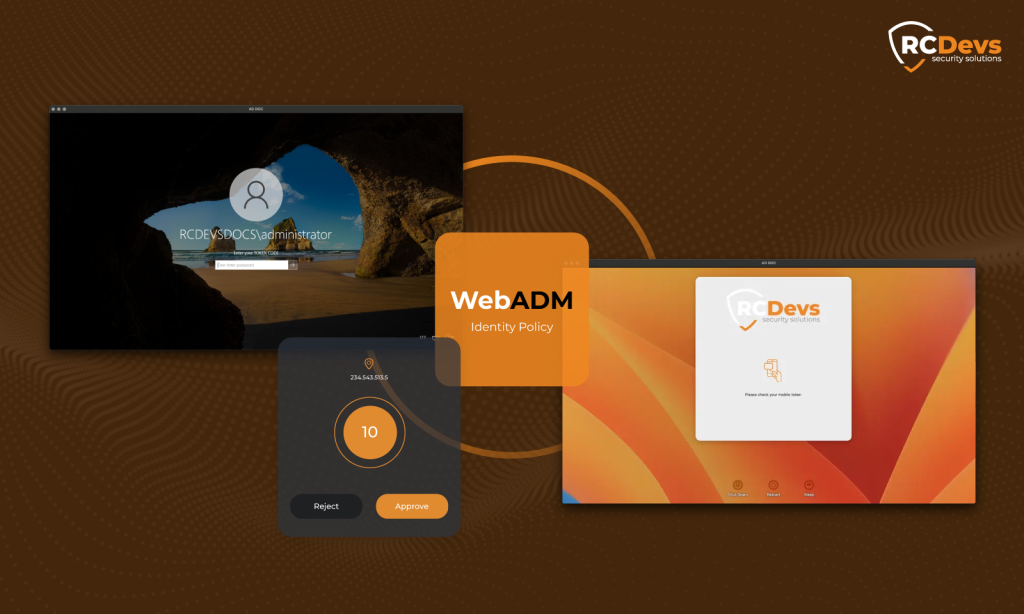
Adding MFA to Windows and macOS logins on an Active Directory domain
Workstation logins were the first perimeter of the proof of concept. On the Windows fleet, the OpenOTP Credential Provider inserts the second factor directly into the Windows logon: the user enters the AD credentials as usual, then confirms a push notification in the OpenOTP Token app. OpenOTP handles both factors: it validates the password and applies the second factor according to the defined policies. Active Directory stays the source of truth: the password is validated against the AD at login.
The organisation also has macOS machines in the same domain, which is less common in the public sector and rules out any solution built for Windows endpoints only. The OpenOTP Credential Provider for macOS brings those sessions under the same policy: same push confirmation, same server, same console. For the administrators, macOS and Windows logins are configured and enforced from the same place, rather than through two separate tools.
SAML single sign-on for the intranet: GLPI, WordPress and applications behind a reverse proxy
The web perimeter came next. The organisation’s intranet applications were connected to the platform’s identity provider over SAML, so that authentication happens once, at the IdP, with MFA enforced there rather than replicated in each application.
Two of those applications are worth naming because so many organisations run them. GLPI, the open-source IT service management platform used to orchestrate tickets and requests across IT teams, was integrated over SAML; both SAML and OpenID Connect were tested during the sessions before the SAML route was retained. The intranet’s WordPress sites were connected the same way. In both cases the application delegates authentication entirely: the user lands on the IdP page, authenticates with the AD password and the push confirmation, and returns to the application signed in.
Part of the organisation’s web estate sits behind an F5 reverse proxy operated by its infrastructure partner, and the authentication flow was configured to work through that layer as well. The point, for a reader with a similar setup, is that a reverse proxy in front of the applications is not an obstacle to centralising authentication behind it.
MFA on the existing SSL-VPN, without replacing the appliance
Remote access was the one path that already had a second factor, and it was also the clearest illustration of the silo problem. Securing it properly did not mean replacing the appliance: OpenOTP connects to SSL-VPN gateways through standard protocols, so the organisation’s existing VPN was pointed at the same authentication server that now protects the workstations and the intranet.
The practical consequence for users is one app instead of two. The vendor token that only ever served the VPN is no longer needed: the same OpenOTP Token app that confirms a Windows login confirms a VPN connection. For the IT team, VPN authentication events land in the same logs and obey the same policies as everything else.

Presence-based logical access: accounts that lock themselves when nobody is there
The proof of concept also covered a layer that goes beyond classic MFA. Presence-based logical access keeps the AD account locked at the LDAP level, at all times, unless the authorised employee has checked in or badged in from an approved location using the OpenOTP Token app. Access locks again automatically at midnight, even if the user forgot to badge out. In practice it behaves as a third factor: not something the user knows or has, but where the user demonstrably is.
For a public authority, the appeal is straightforward. An account that is locked at the directory level outside working presence is an account that cannot be used at 3 a.m. from another continent, whatever credentials the attacker holds. Conditional access approval, where an unusual connection attempt requires a human validation before access is granted, was part of the same evaluation scope.
Access security before and after, per entry point
The shift is easiest to read side by side.
Before / After
Consolidated access security across the whole organisation
MFA is now active across every access path: one platform covering workforce access, remote access and web SSO.
| Access path | Before | After MFA active throughout |
|---|---|---|
| Windows session | AD password | AD password + push confirmation |
| macOS session | AD password | AD password + push confirmation |
| SSL-VPN (remote access) | AD password + vendor token, usable for the VPN only | AD password + second factor from the central authentication server |
| Intranet applications (GLPI, WordPress, SAML apps) | AD password, entered per application | SAML SSO with MFA enforced at the identity provider |
| Web SSO | Planned as a separate Keycloak deployment | Built into the same platform (SAML2, OpenID Connect, OAuth) |
| MFA coverage and management | One per-account overlay for fewer than a hundred accounts, one VPN token, no central view | One server, one console, one mobile app, for the whole workforce |
Organisation gains beyond the second factor
Less to operate, less to pay:
one console, one mobile app, one set of policies for every access path.
| Benefits | Before | After WebADM active |
|---|---|---|
| Administration | One console per solution, tokens and policies managed separately in each silo | One central console for users, groups, access policies, tokens and integrations in WebADM |
| Mobile authenticator | A vendor token usable for the VPN only | One app, the OpenOTP Token, for Windows, macOS, VPN and web logins |
| Revocation | Disabling the AD account cut directory access, but each separate second factor had to be cleaned up on its own | Accounts and second factors revoked together, from one console, across every access path |
| Logs and policies | Authentication events scattered across systems | Every access path in the same logs, under the same policies |
| Unusual connections | Treated like any other login | Conditional access approval can require a human validation before access is granted |
| Attack surface | Accounts usable around the clock with valid credentials | Accounts locked at the directory level outside authorised presence |
| Cost per protected user | A per-account fee covering fewer than a hundred accounts | Five to ten times lower, covering the whole workforce |
What changed is not only that a second factor now exists on every path. It is that enrolment, policy and revocation exist in one place: disabling a user or a token in WebADM takes effect on every access path at once, because every path authenticates against the same server, where the silos of the previous setup each had to be cleaned up separately. The next application the organisation connects, whatever protocol it speaks, inherits the same protection instead of starting a new silo. The same holds for the next population: the schools the organisation operates represent a possible later extension, on the same platform. Active Directory was not migrated, duplicated into a vendor cloud, or restructured: it remains the source of truth it always was, and the entire authentication stack runs on-premise, inside the organisation’s own perimeter.
Further reading
- MFA on Windows Login & RDS
- Credential Provider for macOS login
- SSO with the OpenID & SAML Identity Provider
- Presence-based Logical Access
- Compare OpenOTP with cloud IAM and MFA solutions
The OpenOTP Credential Provider inserts a second factor, such as a push notification, directly into the Windows and macOS logon while the password itself is still validated against Active Directory. In this project both fleets were brought under the same authentication policy, managed from one console.
The existing VPN appliance stays in place: OpenOTP connects to SSL-VPN gateways through standard protocols. In this project the organisation’s VPN was pointed at the same central authentication server as the workstations and web applications, which retired the vendor’s own token.
An existing Keycloak deployment can keep serving the applications integrated with it and delegate the authentication itself to OpenOTP, which validates the password and enforces the second factor behind Keycloak. Migrating to the built-in identity provider of WebADM is the other option: it is what this organisation chose, since its Keycloak deployment had not started and one stack was simpler to operate than two.
A per-account overlay priced for a small set of privileged accounts becomes hard to justify when the objective is MFA for every user on every access path. In this project, the fee the organisation reported for fewer than a hundred protected accounts made extending that coverage to more than a thousand staff unrealistic, which motivated consolidating MFA and SSO on a single platform, at a per-user rate five to ten times lower than the per-account rate reported for the previous overlay.
Presence-based logical access keeps the AD account locked at the LDAP level unless the authorised employee has checked in from an approved location using the OpenOTP Token app, with an automatic re-lock at midnight. It acts as a third factor based on where the user demonstrably is.
Active Directory stays the source of truth: OpenOTP validates the password against the AD at login. The directory was not migrated, restructured or duplicated into a vendor cloud in this project, and the whole authentication stack runs on-premise.