

Ihre Cybersicherheitslösung sollte sich an Ihr Unternehmen anpassen. Nicht umgekehrt.
Ihre Cybersicherheitslösung sollte sich an Ihr Unternehmen anpassen. Nicht umgekehrt.
Jedes Unternehmen arbeitet anders. Sie haben Ihre eigenen Benutzer, Gruppen, Administratoren, Auftragnehmer, Anwendungen, Netzwerke, VPNs, Büros, Heimarbeiter, Authentifizierungsmethoden und Sicherheitsanforderungen.
Warum sollten Sie also die Arbeitsweise Ihres Unternehmens an die Einschränkungen Ihrer Cybersicherheitslösung anpassen?
Das solltest du nicht. Deine Sicherheit sollte sich anpassen an Ihre Organisation und Ihre Regeln.
Das ist einer der Gedanken dahinter WebADM Richtlinien und bedingter Zugriff mit OpenOTP. Anstatt eine einzige Authentifizierungskonfiguration auf alle anzuwenden, ermöglicht Ihnen WebADM, sehr spezifisch zu werden bei wer wann, von welchen Netzwerken aus und unter welchen Bedingungen auf was zugreifen kann.
Und wenn Sie das mit OpenOTP, vertrauenswürdigen Kontexten, Step-Up- und Step-Down-Richtlinien, Ausweisen, Netzwerkbedingungen, Genehmigungsworkflows und risikobasierten Entscheidungen kombinieren, können Sie etwas Nützliches tun:
Erhöhen Sie die Sicherheit dort, wo es darauf ankommt, ohne überall sonst Reibungsverluste zu erzeugen.
Das Problem mit “MFA überall”
Triff Sarah. Sarah arbeitet im Rechnungswesen. Es ist Montagmorgen. Sie sitzt an ihrem üblichen Schreibtisch, benutzt ihren Firmenlaptop im Unternehmensnetzwerk. Sie loggt sich ein.
MFA
Sie öffnet eine weitere geschützte Anwendung.
Schon wieder MFA.
Später verbindet sie sich mit einem anderen Dienst.
Noch eine MFA-Anfrage.
Bis zur Mittagspause hat Sarah das Bügeln schon sehr gut gelernt Genehmigen.
Stellen Sie sich nun vor, dass am Dienstagabend jemand das Passwort von Sarah hat und versucht, sich über eine IP-Adresse zu authentifizieren, die mit verdächtiger Infrastruktur verbunden ist.
Sollte dieser Authentifizierungsversuch genau dieselbe Push-Benachrichtigung erhalten wie Sarah an ihrem Schreibtisch? Wahrscheinlich nicht. Das Problem ist nicht MFA.
Das Problem besteht darin, sehr unterschiedliche Situationen so zu behandeln, als wären sie identisch.
Ein Nutzer braucht nicht eine Richtlinie
WebADM beginnt mit einem geschichteten Richtlinienmodell.
Es gibt eine Standard-Anwendungskonfiguration, aber diese Konfiguration kann für bestimmte Gruppen, einzelne Benutzer, Client-Anwendungen, Gruppen innerhalb dieser Client-Richtlinien und Netzwerke überschrieben werden.
WebADM weist diesen Richtlinienebenen Prioritäten oder Gewichtungen zu. Die spezifischere Richtlinie mit höherer Gewichtung kann die allgemeine Konfiguration überschreiben.
Konzeptionell sieht das in etwa so aus:
Richtlinienhierarchie
Hier fängt jeder an
Verschiedene Regeln für verschiedene Rollen
Ausnahmen für einzelne Benutzer
Verschiedene Regeln für verschiedene Systeme
Besondere Regeln für bestimmte Rollen
Unterschiedliches Verhalten je nach Standort
Das ist wichtig, weil echte Sicherheitsrichtlinien nicht flach sind.
Ein Mitarbeiter, der auf das Intranet zugreift, benötigt nicht unbedingt dieselbe Richtlinie wie ein Administrator, der auf die Produktion zugreift. Ein VPN benötigt nicht unbedingt dieselbe Konfiguration wie die Windows-Anmeldung. Ein internes Netzwerk benötigt nicht unbedingt dieselbe Behandlung wie ein externes Netzwerk. Und ein Auftragnehmer benötigt nicht unbedingt dieselben Zugriffsregeln wie ein festangestellter Mitarbeiter.
WebADM ermöglicht es Ihnen, diese Unterschiede zu modellieren, anstatt so zu tun, als gäbe es sie nicht.
Wer bist du?
Fangen wir mit etwas Einfachem an.
Ihre Standardkonfiguration für OpenOTP erfordert möglicherweise: LDAP + MFA
Das ist Ihre Ausgangsbasis. Aber jetzt haben wir Bob. Bob ist ein Domänenadministrator. Bob hat beträchtlich mehr Rechte als der durchschnittliche Mitarbeiter, daher möchten Sie wahrscheinlich nicht, dass seine Zugriffsrichtlinie identisch ist.
WebADM ermöglicht es Ihnen, die OpenOTP-Einstellungen für eine bestimmte Gruppe zu überschreiben.
Tatsächlich wird dies in der Dokumentation zu RCDevs anhand einer ’Domain Admin“-Gruppe veranschaulicht. In diesem Beispiel wird der OpenOTP-Anmeldemodus auf LDAP- und FIDO-Authentifizierung umgestellt, der OTP-Fallback deaktiviert, der Schutz vor gefälschten Herausforderungen sowie die Passwortprüfung aktiviert und ein Badge-In-/Check-In-Vorgang vorgeschrieben.
Also:
Regulärer Mitarbeiter
Domänenadministrator
- Kein OTP-Fallback
- Zusätzliche Schutzmaßnahmen
Gleiche OpenOTP-Infrastruktur, aber andere Richtlinie. Weil Wer du bist, zählt.
Worauf versuchen Sie zuzugreifen?
Machen wir es jetzt interessanter.
Bob ist nicht einfach nur ein Domänenadministrator. Er ist ein Domänenadministrator, der auf ein bestimmtes System zugreifen möchte.
WebADM Kundenrichtlinien Damit können Sie Richtlinien für eine bestimmte Anwendung oder eine Gruppe von Anwendungen und Servern konfigurieren. RCDevs empfiehlt separate Client-Richtlinien, wenn unterschiedliche Anwendungen unterschiedliche Einstellungen erfordern.
Je nach Integration kann WebADM den Client durch Mechanismen wie eine Client-ID, einen RADIUS-NAS-Identifier, eine NAS-IP-Adresse oder die Client-System-IP identifizieren.
Das bedeutet:
- Bob greift auf eine normale Anwendung zu → Eine Richtlinie.
- Bob greift auf ein Verwaltungssystem zu → Stärkerer Kurs.
- Bob verbindet sich über das Unternehmens-VPN → VPN-Richtlinie.
Die Frage lautet nicht länger einfach: Ist Bob die Authentifizierung erlaubt?
Es wird: Wie sollte sich Bob an dieser speziellen Ressource authentifizieren?
Das ist eine viel nützlichere Frage.
Wo bist du?
Füge nun ein weiteres Stück Kontext hinzu: das Netzwerk.
Eine Client-Richtlinie kann enthalten Netzwerkspezifische Anwendungseinstellungen.
WebADM kann daher die OpenOTP-Konfiguration in Abhängigkeit von dem Netzwerk ändern, aus dem die Authentifizierung stammt.
Die RCDevs-Dokumentation enthält ein Beispiel, in dem Anfragen, die von einem internen 192.168.3.0/24 Ändern Sie den LoginMode von OpenOTP im Netzwerk zu LDAP. Für diesen Mechanismus muss die Client-Integration die IP-Adresse des Benutzers an OpenOTP weiterleiten.
Jetzt wissen wir:
- Wer bist du?
- Welchen Gruppen gehören Sie an?
- Worauf greifst du zu?
- Von wo aus stellen Sie die Verbindung her?
Und WebADM kann diese Informationen nutzen, um zu entscheiden, welche Anwendungseinstellungen gelten sollen.
Wir sind schon weit entfernt von: MFA: EIN/AUS.
Aber es wird noch interessanter.
Was ist, wenn etwas nicht richtig aussieht?
Hier ist Dynamische Anwendungseinstellungen Kommen Sie herein.
WebADM kann die Einstellungen von Webanwendungen oder Webdiensten dynamisch ändern, wenn eine Quell-IP-Adresse als Teil einer Botnetz-Infrastruktur, eines TOR-Netzwerks oder eines öffentlichen VPN-Endpunkts identifiziert wird. RCDevs bietet einen Cloud-Mikroservice an, der diese Überprüfungen anhand öffentlicher IP-Datenbanken durchführt.
Jetzt können wir vorstellen Step-Up.
Stellen Sie sich vor, Sarah authentifiziert sich normalerweise über die Standard-OpenOTP-Richtlinie des Unternehmens. Dann geht eine Authentifizierung über Sarahs Konto ein, die über einen öffentlichen VPN-Endpunkt erfolgt. WebADM kann darauf reagieren, indem es eintritt Step-Up-Modus.
Aber hier ist der interessante Teil.
Step-Up bedeutet nicht einfach “Fordern Sie eine MFA an.”
SIE entscheiden, was Step-Up bedeutet.
In der Beispielkonfiguration von ’RCDevs“ passt „Step-Up“ OpenOTP so an, dass LDAP + OTP erforderlich sind, aktiviert die Push-Anmeldung und ändert die Einstellungen zur Kontosperrung.
Sie könnten also Folgendes haben:
Normaler Kontext
Risikoänderungen
- Stärkere Authentifizierung
- Verschiedene OpenOTP-Einstellungen
- Zusätzliche Schutzmaßnahmen
Sie sind nicht darauf beschränkt, einen weiteren Faktor hinzuzufügen. Sie ändern die die Sicherheitskonfiguration der Anwendung für diesen Fall.
Manchmal ist die richtige Antwort nicht “mehr MFA”, sondern „Nein“.”
Der risikobasierte Modus von WebADM kann noch einen Schritt weiter gehen. Mit der risikobasierten Richtlinie Stufe 1, löst eine entsprechende verdächtige Quelle die konfigurierten Step-Up-Einstellungen aus.
Mit Stufe 2, während ein öffentlicher VPN-Endpunkt Step-Up auslöst, führt eine IP, die als zu einer Botnet-Infrastruktur gehörig identifiziert wurde, zur Verweigerung des Zugriffs. Das ist ein wichtiger Unterschied.
- Wenn etwas ungewöhnlich aussieht: Mach einen Schritt nach vorne.
- Wenn etwas die Risikoschwelle der Organisation überschreitet: Ablehnen.
Es macht wenig Sinn, einem Nutzer jedes Mal eine freundliche Push-Benachrichtigung zu senden, wenn jemand versucht, sich mit seinen Zugangsdaten von einer Infrastruktur aus anzumelden, der Sie bereits Ihr Misstrauen ausgesprochen haben.
Hier ist der spaßige Teil: Sicherheit kann ebenfalls zurücktreten
Bei Diskussionen zum Thema Sicherheit geht es meist darum, etwas hinzuzufügen.
- Weitere Authentifizierung.
- Mehr Steuerelemente.
- Weitere Überprüfung.
- Weitere Eingabeaufforderungen.
Aber da stellt sich noch eine weitere Frage: Was wäre, wenn wir bereits genug Vertrauen hätten?
Warum den Nutzer noch einmal belästigen?
Die dynamischen Anwendungseinstellungen von WebADM unterstützen außerdem Einstellungen für die Spannungsabsenkung.
Der Administrator legt fest, wie sich die Anwendung verhalten soll, wenn die Richtlinie im Step-Down-Modus läuft.
Zum Beispiel:
Normal
LDAP + MFA
Du deaktivierst MFA nicht für das Unternehmen.
Du sagst: Unter diesen besonderen Umständen verfügen wir über genügend zusätzliche Informationen, um vorübergehend eine weniger restriktive Authentifizierungsrichtlinie anzuwenden.
Das ist etwas ganz anderes.
Sarah hat sich gerade im Büro eingecheckt. Sollte das nicht irgendwie zählen?
Hier können physische und digitale Sicherheit zusammenkommen.
Stell dir vor, Sarah kommt um 8:55 Uhr am Hauptquartier an.
Sie meldet sich mit ihrem Ausweis an OpenOTP-Token-App. (Um mehr über Mobile Badging mit OpenOTP zu erfahren, lesen Sie bitte dieser Blog).
Das ist eine Information. Die Organisation hat gerade ein weiteres Signal erhalten, dass Sarah körperlich anwesend ist.
WebADM ermöglicht es, den Betriebsmodus einer Client-Richtlinie vorübergehend zu ändern in Herabstufen, Heraufsetzen oder Ablehnen für einen festgelegten Zeitraum. Der geänderte Modus kann auch zusammen mit gruppen- und/oder netzwerkspezifischen Richtlinien angewendet werden. Step-Down wird nicht automatisch durch den Risikomechanismus ausgelöst; es kann explizit über die Funktion „Modus ändern“ der Richtlinie aktiviert werden.
Zum Beispiel:
08:55 Uhr
Sarah betritt den Raum
Kundenrichtlinie
Änderungen an
Durchsetzen für
1 STUNDE
Reduzierte Authentifizierung
Es gelten Voraussetzungen
Richtlinien für Rücksendungen
zu NORMAL
Das ist viel präziser als zu sagen: “MFA ist im Büro nicht erforderlich.”
Sie könnten stattdessen eine Richtlinie um eine Kombination aufbauen aus: Der Benutzer + ihre Gruppe + das Netzwerk + die Anwendung + der aktuelle Betriebsmodus.
Also vielleicht: Mitarbeiter + hat sich angemeldet + Unternehmensnetzwerk → Für eine Stunde zurücktreten.
Aber: Privilegierter Administrator + Unternehmensnetzwerk → Phishing-resistente Authentifizierung ist weiterhin erforderlich.
Und: Mitarbeiter + externes Netzwerk → Normales MFA.
Ihre Organisation entscheidet, was sinnvoll ist.
Vertrauenswürdige Kontexte: “Habe ich nicht gerade bewiesen, wer ich bin?”
OpenOTP verfügt über einen weiteren nützlichen Mechanismus zur Reduzierung des Authentifizierungsaufwands: Kontextabhängige Anmeldung.
Bei aktiviertem Trusted Contexts kann OpenOTP nach einer erfolgreichen Zwei-Faktor-Authentifizierung einen vertrauenswürdigen Benutzer-Geräte-/IP-Kontext erkennen.
Nachfolgende Anfragen, die diesem vertrauenswürdigen Kontext entsprechen, können den Anmeldemodus (LoginMode) auf „nur LDAP“ umstellen.
Das Vertrauen muss auch nicht ewig halten. Ablauf des Kontexts bestimmt, wann der Kontext der vertrauenswürdigen IP bzw. des vertrauenswürdigen Geräts abläuft, während Kontexterneuerung den Kontext nach erfolgreichen Anmeldungen bis zu einer konfigurierten Maximallaufzeit verlängern.
Also:
Erste Anmeldung
Passwort + MFA
Vertrauen hergestellt
für diesen Kontext
Späterer Login
Derselbe vertraute Kontext
Geringere Reibung
Kontext läuft ab
MFA erneut erforderlich
Das liefert Ihnen ein nützliches Prinzip: Vertrauen wird erarbeitet, ist zeitlich und thematisch begrenzt und temporär.
Der Benutzer wird nicht einfach von MFA ausgenommen. OpenOTP nutzt zuvor etablierten Kontext, um zu bestimmen, ob eine weitere Abfrage erforderlich ist.
Jetzt füge alles zusammen
Hier ist WebADM-Richtlinien viel interessanter werden als ein Kontrollkästchen mit der Aufschrift “MFA erforderlich”.”
Wenn jemand Zugriff anfordert, kann Ihre Richtlinie potenziell mehrere Dimensionen berücksichtigen:
Das ist die Geschichte.
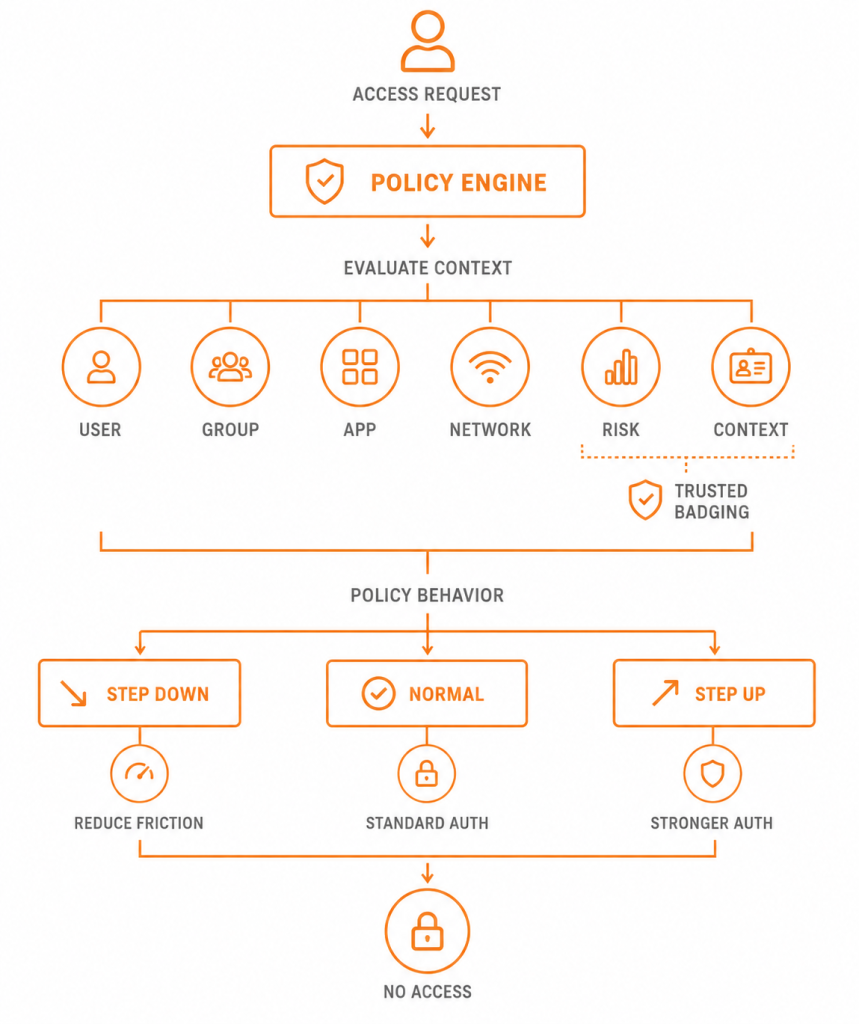
- Identität ist wichtig.
- Gruppenzugehörigkeit ist wichtig.
- Die Anwendung ist von Bedeutung.
- Das Netzwerk ist wichtig.
- Risiko spielt eine Rolle.
- Zuvor aufgebautes Vertrauen ist wichtig.
- Physische Ausweise können eine Rolle spielen.
Und Ihr Unternehmen entscheidet, wie wichtig jede dieser Dinge ist.
Feingranular bedeutet nicht schmerzhaft
Hier gibt es einen wichtigen Punkt.
Wir haben gerade eine Menge Steuerelemente besprochen. Der Benutzer sollte keines davon verstehen müssen.
Sarah muss nicht wissen, dass WebADM ihre Gruppe, die Client-Richtlinie, das Netzwerk, den vertrauenswürdigen Kontext, den Risikozustand und den aktuellen Richtlinienbetriebsmodus ausgewertet hat.
Sie sollte einfach die entsprechende Erfahrung sammeln.
- In einer normalen Situation: Anmeldung genehmigen.
- In einem etablierten, vertrauenswürdigen Kontext: Vielleicht sieht sie nicht einmal eine MFA-Aufforderung.
- Wenn das Risiko steigt: Zusätzliche Authentifizierung erforderlich.
- Wenn die Richtlinie besagt, dass das Risiko nicht akzeptabel ist: Zugriff verweigert.
Die Komplexität gehört in den Richtlinien-Engine, nicht in der täglichen Erfahrung des Nutzers.
So funktionieren feingranulare Zugriffskontrollen tatsächlich Reibung abbauen, anstatt mehr davon zu erzeugen.
Manchmal sollte die Richtlinie lauten: “Frag jemanden”
Nicht jede Zugangsentscheidung kann oder sollte vollständig automatisiert werden.
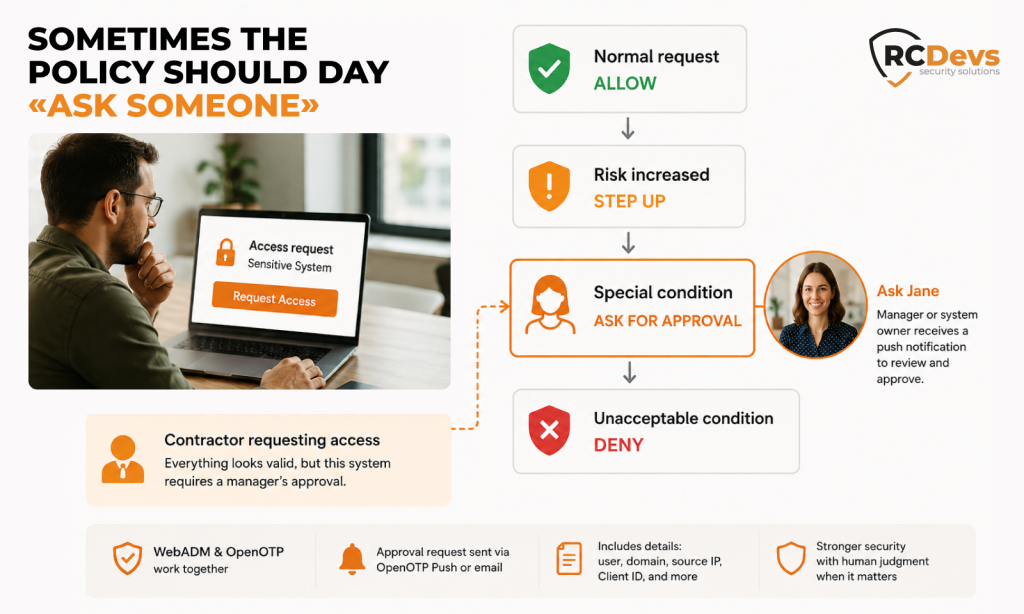
Stellen Sie sich vor, ein Auftragnehmer bittet um Zugriff auf ein sensibles System. Alles mag technisch gültig sein, aber die Organisation möchte dennoch, dass ein Manager oder Systemverantwortlicher die Anfrage genehmigt.
WebADM unterstützt Zugriffsgenehmigungsbedingungen dafür.
Der Zugriff kann die Genehmigung durch einen oder mehrere festgelegte Genehmiger erfordern. WebADM und OpenOTP generieren die Genehmigungsanfrage, und autorisierte Genehmiger können sie über die Push-Funktion der OpenOTP Token-Anwendung erhalten. Die Genehmigungs-E-Mail kann auch Transaktionsdetails wie den Benutzer, die Domäne, die Quell-IP und die Client-ID enthalten.
Manchmal lautet die richtige Sicherheitsentscheidung tatsächlich: Frag Jane.
“Unterzeichnen Sie dies, bevor Sie Zugriff erhalten.”
Es gibt noch eine weitere interessante Client-Richtlinien-Funktion: Benutzerzugriff-Einwilligung / Vertragsschluss.
WebADM kann verlangen, dass Benutzer ein Dokument signieren, bevor sie Zugriff auf ein System erhalten.
Dieses Dokument kann eine Vertraulichkeitsvereinbarung (NDA), Allgemeine Geschäftsbedingungen, eine Nutzungsrichtlinie oder eine andere Vereinbarung sein. Das unterzeichnete Dokument kann eine Gültigkeitsdauer haben, und wenn sich das Originaldokument ändert, kann WebADM verlangen, dass der Benutzer die aktualisierte Version unterzeichnet, bevor er sich erneut authentifiziert.RCDevs | Dokumentationszentrum)
Das erzeugt Arbeitsabläufe wie:
Auftragnehmer beantragt Zugang
Authentifizieren
NDA unterzeichnen
Genehmigung durch den Vorgesetzten
Zugriff gewährt
Das ist ein gutes Beispiel dafür, dass bedingter Zugriff nicht bei der Authentifizierung auf hören muss.
Manchmal lautet die Zugriffsregel Ihres Unternehmens wirklich: Sie können auf dieses System zugreifen, nachdem Sie dieses Dokument unterzeichnet und Ihr Vorgesetzter es genehmigt hat.
Warum sollte das Sicherheitssystem diese Regel nicht durchsetzen?
Wie lässt sich das mit Microsoft Conditional Access vergleichen?
Es gibt einen offensichtlichen Vergleich mit Microsoft Entra Conditional Access.
Beide Ansätze haben eine wichtige Idee gemeinsam: Treffen Sie keine Zugriffsentscheidungen allein auf der Grundlage von Anmeldedaten. Bewerten Sie den Kontext und wenden Sie die entsprechenden Kontrollen an.
Aber ich würde WebADM nicht als “unsere Version von Microsoft Conditional Access” bezeichnen. Das ist nicht das Interessante daran.
Die interessante Frage ist: Wie sieht Ihre tatsächliche Infrastruktur aus?
Viele Unternehmen leben nicht vollständig in einem einzigen Identitätsökosystem.
Sie haben möglicherweise:
- Active Directory
- LDAP
- RADIUS
- VPNs
- Firewalls
- Windows
- Linux
- SAML-Anwendungen
- OpenID-Connect-Anwendungen
- Lokale Systeme
- Cloud-Dienste
- Alte Anwendungen, die immer noch hervorragend ihren Dienst tun
WebADM-Client-Richtlinien können Integrationen mithilfe von Mechanismen wie RCDevs-Client-IDs, RADIUS-NAS-Kennungen und IP-Adressen abgleichen. RCDevs unterstützt über seinen Identitätsanbieter zudem SAML- und OpenID Connect-Integrationen.
Anstatt also Ihre Architektur für Zugriffsrichtlinien an ein bestimmtes Cloud-Ökosystem anzupassen, lassen sich WebADM und OpenOTP in die gemischte Infrastruktur integrieren, die viele Unternehmen bereits betreiben.
Das ist ein wichtiger Unterschied.
Ihre Infrastruktur muss nicht erst zu der Vorstellung einer Infrastruktur von jemand anderem werden, bevor Sie darauf kontextbezogene Authentifizierung anwenden können.
Entwickeln Sie Richtlinien, die auf die tatsächlichen Arbeitsabläufe in Ihrem Unternehmen zugeschnitten sind
Anstatt ein OpenOTP-Deployment mit der Frage zu beginnen: “Wo sollten wir MFA aktivieren?”
Versuchen Sie zu fragen: “Welches Authentifizierungsniveau benötigen wir eigentlich unter den jeweiligen Bedingungen?”
Am Ende haben Sie vielleicht etwas wie:
| Situation | Richtlinie |
|---|---|
| Normaler Mitarbeiterzugang | Standard-MFA |
| Vertrauenswürdiges Gerät + vertrauenswürdige IP | Geringere Reibung |
| Administrator mit erweiterten Rechten | Phishing-sichere Authentifizierung |
| Unternehmensnetzwerk | Netzwerkspezifische Richtlinie |
| Externes Netzwerk | Standard-MFA |
| Öffentlicher VPN-Endpunkt | Step-Up |
| Botnet-assoziierte IP | Ablehnen |
| Kürzlich eingestellter Mitarbeiter | Vorübergehende Herabstufung |
| Vertraulicher Auftragnehmerzugang | Genehmigung durch den Vorgesetzten |
| Die erforderliche Vereinbarung wurde nicht unterzeichnet | Vor dem Betreten unterschreiben |
Es gibt keine allgemeingültige Tabelle, die für jede Organisation passt. Und genau darum geht es.
Ihre Regeln. Ihre Richtlinien.
Jedes Unternehmen hat bereits Zugriffsregeln.
Das Problem ist, dass sie oft über Active-Directory-Gruppen, VPN-Konfigurationen, Firewall-Regeln, MFA-Einstellungen, physische Zugangssysteme, Anwendungsberechtigungen, Tabellenkalkulationen, interne Abläufe und Anweisungen verstreut sind, die enden mit: “Wenn das passiert, ruf Mike an.“
Das Richtlinienmodell von WebADM bietet Ihnen eine Möglichkeit, mehr dieser Regeln rund um die Authentifizierung selbst auszudrücken.
- Wer bittet um Zugriff?
- In welcher Gruppe sind sie?
- Worauf greifen sie zu?
- Wo sind sie?
- Wurde das Vertrauen bereits aufgebaut?
- Ist die Situation riskanter geworden?
- Haben sie sich eingeloggt?
- Muss das jemand genehmigen?
- Müssen sie erst etwas unterschreiben?
Und dann OpenOTP kann sich anpassen.
- Normal? Verwenden Sie die normale Richtlinie.
- Vertrauenswürdig? Reduzieren Sie unnötige Reibung.
- Erhöhtes Risiko? Mach einen Schritt nach vorne.
- Wird eine Genehmigung benötigt? Um Genehmigung bitten.
- Risiko inakzeptabel? Ablehnen.
Das Ziel ist nicht, mehr hineinzustecken Sicherheitseingabeaufforderungen vor den Nutzern. Damit sollen bessere Zugriffsentscheidungen getroffen werden.
- Wenn alles normal aussieht, Wende die normale Richtlinie an.
- Wenn bereits Vertrauen aufgebaut wurde, Gehen Sie dem Benutzer aus dem Weg.
- Wenn sich der Kontext ändert, anpassen.
- Wenn das Risiko steigt, Erhöhen Sie die Sicherheit.
- Wenn eine manuelle Freigabe sinnvoll ist, Frage danach.
- Und wenn das Risiko inakzeptabel ist, sagen Sie einfach NEIN.
Genau das sollten detaillierte Zugriffsrichtlinien leisten.
Ihr Unternehmen verfügt bereits über eigene Benutzer, Gruppen, Anwendungen, Netzwerke, Workflows, physische Zugangskontrollen, Ausnahmen und Sicherheitsanforderungen. Ihre Cybersicherheitslösung sollte Sie nicht dazu zwingen, all dies um ein vordefiniertes Modell herum neu zu organisieren.
Es sollte sich an die tatsächlichen Abläufe in Ihrem Unternehmen anpassen.
Mit WebADM-Richtlinien und OpenOTP definieren Sie die Regeln. OpenOTP wendet je nach Kontext die entsprechenden Authentifizierungsanforderungen an.
Das Ergebnis ist nicht mehr Authentifizierung. Es ist die richtige Authentifizierung, zur richtigen Zeit, für den richtigen Zugriff.
Und für den Benutzer? Im Idealfall bekommt er gar nicht mit, wie viel im Hintergrund passiert.
Ihr Unternehmen. Ihre Regeln. Cybersicherheit, die sich anpasst.