

Multi-Factor Authentication versus Passwordless Authentication: What’s the Difference (and Why You Probably Need Both)
Multi-Factor Authentication versus Passwordless Authentication: What’s the Difference (and Why You Probably Need Both)
81% of hacking-related breaches involve stolen or weak passwords, according to the Verizon Data Breach Investigations Report (DBIR). Meanwhile, Microsoft blocks thousands of password attacks every second, from password spraying and credential stuffing to phishing campaigns targeting Microsoft 365 accounts.
Passwords have served us well for decades, but they’re also one of the biggest security liabilities organizations face today.
If you’ve ever forgotten a password five minutes after creating it, clicked “Forgot Password” for the third time this month, or received an unexpected MFA prompt at 2 a.m., you’ve already experienced the challenges of modern authentication.
As organizations strengthen their identity security, two terms dominate the conversation:
- Multi-Factor Authentication (MFA)
- Passwordless authentication
They’re often used interchangeably. They shouldn’t be.
While both improve security, they solve different problems, and in most organizations, they work best together.
Let’s explore why.
What is Multi-Factor Authentication (MFA)?
Multi-Factor Authentication (MFA) is an authentication method that requires users to prove their identity using two or more independent authentication factors.
Think of entering a secure datacenter. The security guard doesn’t simply ask your name.
You might need:
- Your employee badge (something you have)
- A PIN (something you know)
- A fingerprint (something you are)
Only after multiple checks does the door unlock. Authentication follows the same principle.
The three authentication factors are:
🧠 Something you know
- Password
- PIN
- Passphrase
📱 Something you have
- Smartphone
- Hardware security key
- Smart card
- OTP token
👤 Something you are
- Fingerprint
- Face recognition
- Iris scan
A common login today looks like this:
- Enter your password.
- Approve a push notification on your phone.
- Access granted.
Even if an attacker steals your password, they still need your phone.
That’s the strength of MFA.
Why MFA Matters
Imagine an employee unknowingly enters their Microsoft 365 password into a phishing website.
Without MFA? The attacker logs in immediately.
With MFA? The attacker still needs the second factor.
This dramatically reduces the effectiveness of:
- Credential theft
- Password spraying
- Brute-force attacks
- Password reuse
- Many phishing attacks
- Unauthorized remote access
This is why regulations like NIS2, DORA, PCI DSS, HIPAA, and many cybersecurity frameworks require or strongly recommend MFA for protecting sensitive systems.
What is Passwordless Authentication?
Passwordless authentication removes the password entirely.
Instead of asking users to remember a secret, authentication relies on stronger credentials such as:
- Passkeys
- FIDO2 security keys
- Smart cards
- Client certificates
- Mobile push authentication
- Biometrics on trusted devices
Instead of proving you know something, you prove you possess a trusted device, and often verify your identity using biometrics or a local PIN.
If you’ve unlocked your phone with Face ID and signed into an application without typing a password, you’ve already experienced passwordless authentication.
No password. No password reset. No sticky note under the keyboard saying:
Password = Summer2026! (Yes, attackers thank you for that.)
Why Passwordless Is More Secure
Attackers love passwords because passwords can be:
- Stolen
- Guessed
- Reused
- Leaked
- Shared
- Phished
Passkeys and FIDO2 credentials work differently.
They’re based on public-key cryptography and are cryptographically bound to the legitimate application or website.
Imagine someone builds a perfect fake copy of your online banking website.
A password? You might unknowingly type it.
A passkey? It simply refuses to authenticate because it recognizes the site isn’t genuine.
It’s like your house key refusing to unlock your neighbor’s front door, even if the house looks identical.
Passwordless Is Also Easier for Users
Let’s be honest. Nobody enjoys passwords.
We’ve all been there:
- Forgot a password immediately after creating it.
- Used the same password everywhere.
- Added “!” because the password policy required it.
- Named the spreadsheet Passwords_Final_v9_Really_Final.xlsx.
Passwordless removes that entire problem.
Benefits include:
- Faster sign-ins
- No password resets
- Reduced helpdesk calls
- Better user experience
- Strong resistance to phishing
Your IT support team might finally have time for something other than resetting passwords.
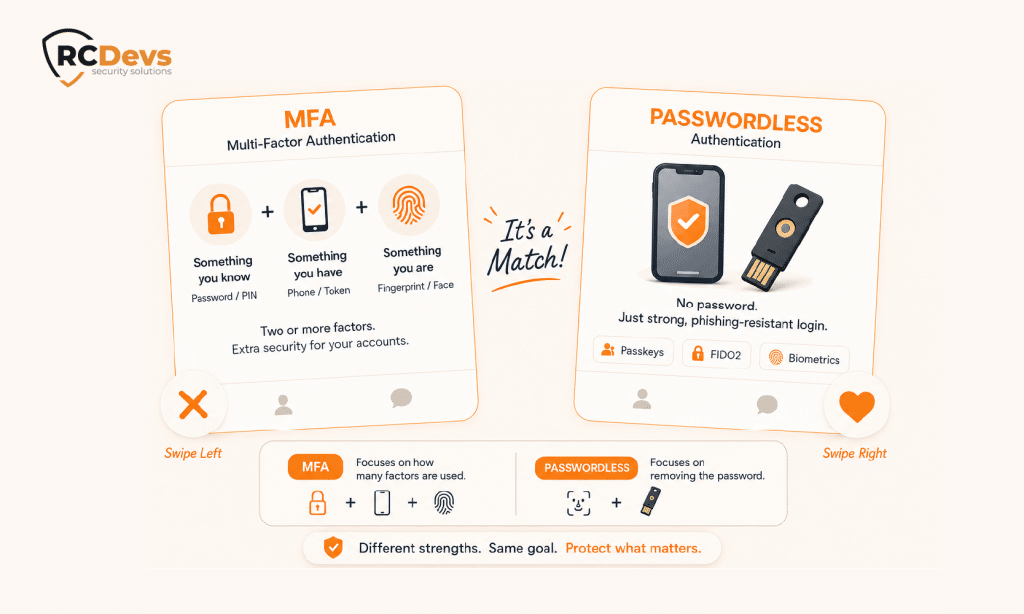
MFA vs. Passwordless: The Difference in One Picture
Many people ask:
“Which is better: MFA or passwordless?”
That’s actually the wrong question, as they describe different aspects of authentication.
Authentication
Is a password involved?
How many authentication factors are required?
Or even simpler:
One describes whether a password is used. The other describes how many factors are required.
They’re complementary, not competing technologies.
Passwordless Can Still Be MFA
Consider these examples.
Example 1
A FIDO2 security key protected by a PIN.
✔ Something you have
✔ Something you know
No password. Still MFA.
Example 2
A Passkey unlocked with Face ID.
✔ Trusted device
✔ Biometric verification
Again:
Passwordless. Multi-factor. Both at the same time.
Myth vs. Reality
| Myth | Reality |
|---|---|
| Passwordless replaces MFA. | Many passwordless methods are themselves multi-factor. |
| MFA always means entering a password first. | MFA can be completely passwordless. |
| Passwordless works everywhere today. | Many legacy applications still depend on passwords. |
| Passwords will disappear next year. | Most organizations will operate hybrid authentication environments for years. |
| Passwordless eliminates all identity risks. | Strong authentication must still be combined with device security, access policies, monitoring, and identity governance. |
Why Isn’t Everyone Passwordless Yet?
If passwordless is so good… Why doesn’t every company simply switch tomorrow? Because enterprise IT isn’t built overnight.
Legacy Applications
Many business-critical applications only understand:
That’s it. No Passkeys. No FIDO2. No biometrics. Replacing these applications can take years, and millions of euros. Adding MFA is often the safest and most practical solution.
Shared Workstations
Imagine:
- Nurses sharing hospital computers
- Warehouse operators using common terminals
- Factory workers rotating between production stations
Managing personal passkeys on shared devices isn’t always practical.
Smart cards, hardware tokens, or mobile authentication may be a better fit.
Offline Environments
- Oil platforms.
- Military networks.
- Factories.
- Industrial control systems.
- Some environments intentionally operate without Internet connectivity.
Organizations need authentication methods that continue working, even offline.
Regulatory Constraints
Many organizations have already invested heavily in:
- Smart cards
- PKI certificates
- Hardware tokens
These technologies remain highly secure and often satisfy strict regulatory requirements. Modernization happens gradually, not overnight.
Not Everyone Has a Trusted Device
Employees usually do.
- Contractors?
- Consultants?
- Temporary workers?
- Third-party vendors?
Not necessarily. Authentication strategies must accommodate every type of user.
Hybrid Infrastructures
Today’s enterprise is rarely just Microsoft 365.
Instead, it’s a mix of:
- Active Directory
- LDAP
- Linux
- VPNs
- RADIUS
- SaaS
- Cloud platforms
- Legacy business applications
Moving all of these to passwordless requires a phased migration, not a weekend project.
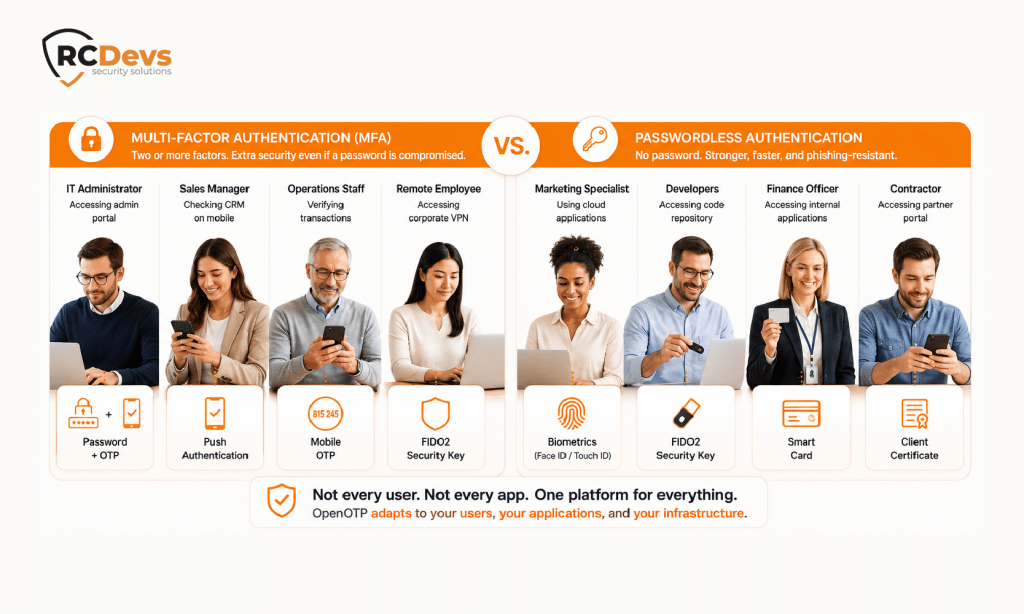
The Reality: Most Organizations Need Both
A modern authentication strategy usually looks like this:
| User | Recommended Authentication |
|---|---|
| Office employees | Passkeys or FIDO2 |
| Privileged administrators | Hardware security keys + MFA |
| VPN users | Push authentication or FIDO2 |
| Legacy applications | Password + MFA |
| Shared workstations | Smart cards or hardware tokens |
| Offline users | Offline OTP or smart cards |
Different users with different applications and different authentication methods. But just one security strategy.
A Practical Migration Roadmap
Rather than trying to eliminate passwords overnight, organizations typically modernize authentication in phases.
Step 1 – Protect Existing Passwords
Deploy MFA across VPNs, remote access, cloud applications, and privileged accounts to immediately reduce the risk of compromised credentials.
Step 2 – Introduce Passwordless Where It Makes Sense
Enable Passkeys or FIDO2 security keys for users and applications that already support modern authentication standards, such as Microsoft Entra ID or Google Workspace.
Step 3 – Modernize Legacy Applications
As legacy applications are upgraded or replaced, gradually introduce passwordless authentication while maintaining MFA where passwords remain unavoidable.
Step 4 – Adapt Authentication to Risk
Not every user requires the same authentication method. Administrators, contractors, remote workers, and frontline employees often have different operational requirements. A flexible authentication strategy allows organizations to apply the right level of security to each use case.
Choosing the Right Authentication Strategy
Instead of asking:
“Should we deploy MFA or passwordless?”
Ask:
- Which applications support passwordless today?
- Which users can realistically adopt Passkeys or FIDO2?
- Which systems still require passwords?
- How do we secure hybrid environments?
- Which authentication methods provide the right balance between security, usability, compliance, and operational complexity?
There is no universal answer. Every organization’s journey is different.
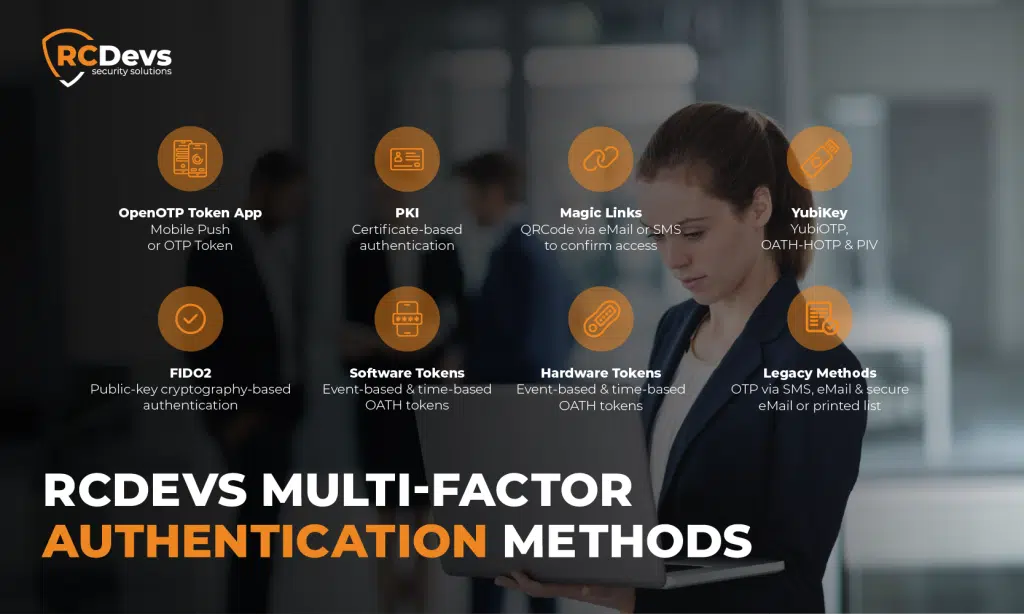
OpenOTP: A Flexible Approach to Modern Authentication
The reality is that very few organizations operate in an all-cloud, all-modern environment. Most need to support a combination of legacy systems, modern applications, on-premises infrastructure, cloud services, remote users, and shared workstations, all at the same time.
That’s where flexibility becomes essential.
Rather than forcing organizations to choose between MFA and passwordless authentication, OpenOTP enables both to coexist within a single authentication platform, centralizing identities and access.
Whether users authenticate with:
- Password + OTP
- Push notifications
- FIDO2 security keys
- Passkeys
- Smart cards
- PKI certificates
- Mobile authenticators
- Offline OTP
- Hardware tokens
- Biometrics through modern standards
OpenOTP provides a unified authentication framework capable of supporting each method according to the application’s capabilities and the organization’s security policies.
This allows organizations to:
- Secure legacy applications without replacing them.
- Introduce passwordless authentication where supported.
- Support hybrid Active Directory, LDAP, Linux, VPN, RADIUS, cloud, and SaaS environments.
- Apply different authentication methods to different user populations.
- Modernize authentication at their own pace without disrupting users or existing infrastructure.
Instead of a disruptive “big bang” migration, organizations can evolve gradually, protecting today’s systems while preparing for tomorrow’s passwordless future.
Final Words
Passwords are slowly disappearing, but they aren’t disappearing everywhere.
For years to come, most organizations will operate hybrid authentication environments where passwords, MFA, and passwordless technologies coexist.
The goal shouldn’t be to eliminate passwords at all costs.
The goal should be to provide every user with the strongest, most appropriate authentication method for their environment, while maintaining compatibility with existing systems and ensuring a frictionless user experience.
Ultimately, modern authentication isn’t about choosing MFA or passwordless.
With its broad support for traditional MFA, modern passwordless technologies, smart cards, certificates, hardware tokens, and legacy authentication methods, OpenOTP provides that flexibility, allowing organizations to strengthen identity security today while preparing for a passwordless tomorrow.
It’s about building an authentication strategy that can support both, and evolve as your organization evolves.
Whether your organization is strengthening its MFA capabilities, transitioning to passwordless authentication, or combining both approaches, OpenOTP adapts to your security, operational and integration requirements.